Moving your website to a Content Delivery Network (CDN) is usually done to make your pages load faster and handle traffic better. However, if you do not plan the move carefully, a CDN setup can unexpectedly slow down your main server or accidentally block Google from crawling your pages.
In a recent Search Off the Record discussion, Google Search relations experts Gary Illyes and Cherry Prommawin shared practical guidance on why CDN migrations go wrong and what website owners should do to protect their search visibility. At Lee & Nee Softwares (Exports) Ltd, a trusted SEO company in Kolkata, we see many growing businesses add a CDN to improve speed, only to run into avoidable crawl or firewall issues. Here is a simple, clear breakdown of Google’s advice and how you can keep your site safe.
Table of Contents
ToggleWhy Moving to a CDN Can Create Sudden Server Pressure
Many website owners assume that once a CDN is turned on, their main hosting server (called the origin server) immediately gets a break. In reality, the exact opposite often happens right after launch.
- Faster Responses Signal Googlebot to Crawl Faster: Google’s crawlers monitor how quickly your server replies. When a CDN edge server starts responding faster, Googlebot assumes your infrastructure is strong and gradually increases its crawl rate. As Gary Illyes described it, CDNs can take the valve off the hose so crawlers start drinking from a fire hose.
- An Empty Cache Does Not Protect Your Origin Server: When you first switch to a CDN, its cache is empty. A CDN cannot serve a page from cache until someone or something requests that URL first. Because Googlebot visits thousands of URLs across a website, those initial un-cached requests still pass directly through to your origin server. Until the cache fills up, your main server ends up doing all the heavy lifting under higher crawl demand.
The Biggest Mistake: Accidental Googlebot Blocking
When server traffic suddenly spikes after a CDN launch, technical teams often worry that bad bots or scrapers are attacking the site. In a rush to stop the load, admins sometimes turn on blanket security rules, aggressive Web Application Firewall (WAF) blocks, or CAPTCHA challenges for all automated traffic.
The problem is that blanket rules treat legitimate search engine crawlers the exact same way as harmful bots. If your CDN or firewall starts serving 403 Forbidden walls or challenge pages to Googlebot, Google cannot read your content properly—which can directly hurt your rankings and indexing.
Google’s Step-by-Step Checklist for a Safe CDN Migration
To make sure your CDN upgrade improves speed without hurting your SEO, follow these practical steps recommended by Google:
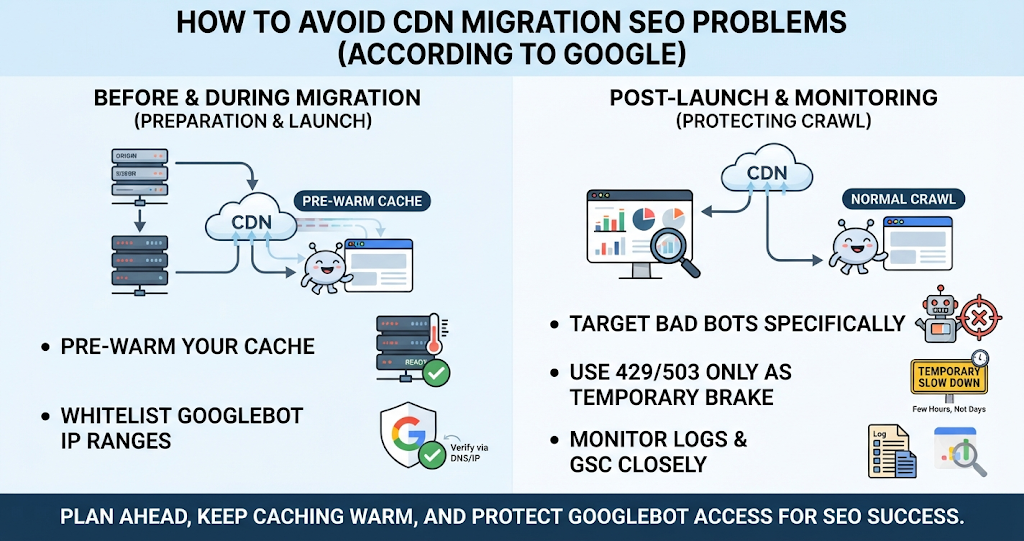
1. Pre-Warm Your CDN Cache Before Launch
Do not wait for search engines to hit an empty cache. Before routing full crawler traffic through the CDN, pre-warm your cache by programmatically fetching your most important pages—such as your homepage, top-performing landing pages, seasonal offer pages, and frequently crawled URLs—at a steady, controlled pace. That way, the CDN already has ready copies stored when Googlebot arrives.
2. Whitelist Verified Search Engine Crawlers
Before enabling any strict bot-filtering rules in your CDN or firewall, turn on the setting to allow verified or known bots. Major CDNs and WAFs include managed options to let verified crawlers like Googlebot pass through without hitting CAPTCHAs or blocks. For extra accuracy, verify crawlers by their official IP ranges or reverse DNS rather than user-agent strings alone.
3. Target Unwanted Bots Specifically Instead of Blanket Blocks
If scrapers or low-value bots are putting pressure on your server, block only those specific unwanted bots using targeted rules or your robots.txt file. Avoid broad rules that block every automated visitor at once.
4. Use Temporary Rate Limiting Only as an Emergency Brake
If your origin server still gets overloaded during the switch and threatens downtime for real visitors, Google recommends temporarily slowing down crawler requests rather than blocking them permanently:
- Configure your CDN or server to return an HTTP 429 (Too Many Requests) or 503 (Service Unavailable) status code with a Retry-After header for crawlers.
- Keep this emergency brake active only for a short window—typically a few hours, or 1 to 2 days at most—until your cache warms up and server load settles.
- Once stability returns, lift the restriction so Googlebot can crawl smoothly again.
5. Monitor Logs and Google Search Console Closely
During and right after the migration, check your CDN logs for Googlebot IP traffic to confirm crawlers are receiving normal 200 OK responses rather than 403 errors or challenge screens. Also review the Crawl Stats report in Google Search Console to track response times and crawl spikes.
Keep Your Technical Migrations Smooth and Risk-Free
Adding a CDN is a smart move for user experience and site speed, provided your caching and bot rules are configured properly before launch. Planning ahead prevents server overload, protects Googlebot access, and ensures your search rankings stay steady.
If you are planning a CDN setup, server upgrade, or technical site audit and want experienced guidance, Lee & Nee Softwares (Exports) Ltd is here to support your business. As a reliable seo company in kolkata, our team helps organizations manage technical SEO changes safely so faster performance turns into stronger search visibility.